Getting started
- Try it first, if you like. The emulator runs the real firmware in a web page: no FM-1 needed. The screens below are its screens.
- Your music is kept. Your projects, presets, samples and settings are kept when you install, so a backup is optional (the update also keeps projects from earlier versions of Maqam's base firmware; see the home page).
- Install. Connect the FM-1 by USB, open the installer in Chrome or Edge and press Install. Do not unplug the cable while it writes. If an install is interrupted, press Install again; if the FM-1 no longer starts, hold OCT− alone while switching it on (USB rescue) and install again.
- Play a maqam in two moves. Hold SEL, turn PRESETS to
arab, turn KNOB 2 to a maqam, set KNOB 3 towhite, and press the root key; let go and play the white keys up and down. The rest of this page explains every control.
Which scales there are, and how each is tuned: the 52 scales.
How to play Maqam: the scale screens
How to read and work the screens for Maqam's 52 scales (Western, Turkish, Arabic, Indian), quarter tones and step bends (the CENT lock). The images are the firmware's own screen, rendered on a computer: what you see on the FM-1 is the same.
Two words used throughout:
- Half-flat (written
Edin text, andEwith a reversed flat on the screen) is a quarter tone, 50 cents, below the note: E half-flat sits halfway between E♭ and E. - Half-sharp (written
E+,Ewith a one-stem sharp) is a quarter tone above.
There are two ways into the scales:
| How | What it changes | |
|---|---|---|
| The KEY layer | hold SEL | the key of the whole song (all three synth tracks), the scale set, the tuning |
| The SEL page | tap SEL | the selected track's root, scale, keys mode and chords |
Most of the time you want the KEY layer.
1. The KEY layer (hold SEL)
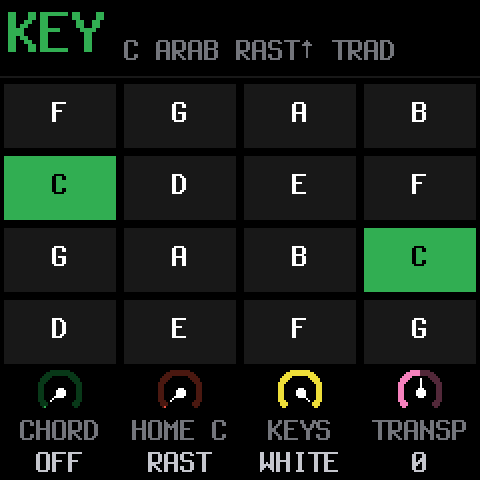
The title bar reads root, set, scale, tuning: C ARAB RAST TRAD means:
- Rast, from the Arabic set,
- with C as its root,
- in TRADITIONAL tuning.
The 16 tiles are the 16 white keys of the FM-1, in the same order:
- Top row: F G A B.
- Second row: C D E F.
- Third row: G A B C.
- Bottom row: D E F G.
What the tiles show:
- Green tiles are the root: here both C keys.
- White text marks a key whose note, or a quarter tone either side of it, is in the scale. In Rast, E is lit because E half-flat is right next to it.
- Dim text marks a key with no scale note nearby. Rast uses them all; see Segah below for dim ones.
While SEL is held:
| Control | Does |
|---|---|
| a key (white or black) | sets the root to that note |
| OCT− + a key | root a quarter tone lower: OCT− + E = E half-flat |
| OCT+ + a key | root a quarter tone higher |
| PRESETS | the scale set: WEST → TURK → ARAB → INDIA (jumps to the set's first scale) |
| KNOB 1 chord | chord mode: off, triad, 7th, 9th, sus4, power |
| KNOB 2 scale | the scale, within the current set (it wraps around) |
| KNOB 3 keys | how the keys play the scale: off, snap, white (see below) |
| KNOB 4 transp | transposes the track by semitones |
| ALGORITHM | tuning: turn right for TRADITIONAL, left for EQUAL |
The home hint
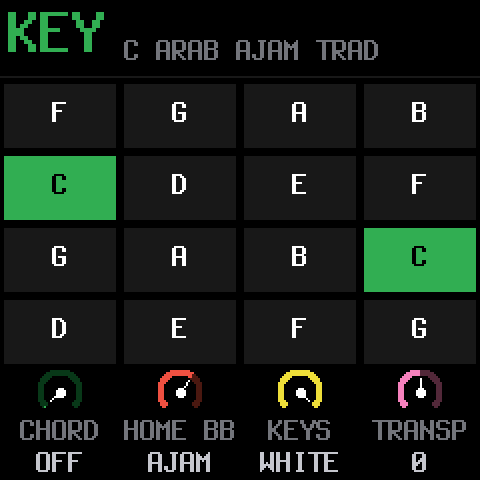
For Turkish, Arabic and Indian scales, the label over KNOB 2 shows the scale's traditional home, here HOME BB for Ajam. Maqam writes labels in capitals, so BB means B♭. It is only a hint:
- Choosing a scale never changes your root. Ajam plays from C here.
- To play it at home, press B♭ while SEL is held.
- Any scale works from any root, with the same intervals and tuning.
The three keys modes (KNOB 3)
white | snap |
|---|---|
| 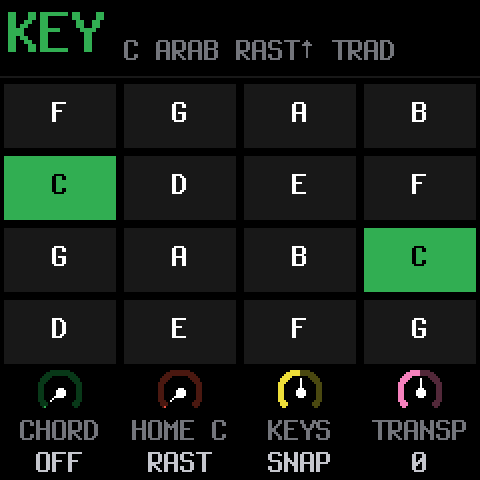 |
- white: the white keys walk the scale's notes in order, starting from C4 = the root, and the black keys are silent. A 7-note maqam fits one octave in 7 white keys, so it's the easiest way to play any maqam. The layout comes from the form of the scale with more notes, so it never shifts with the direction; a note the form you are playing lacks is replaced by the next note of that form, above it going up, below it going down (Asavari on C going up plays C D F F G A♭ C C on the keys C4 to C5; going down, C D E♭ F G A♭ B♭ C). Recommended.
- snap: every key plays. Each key covers its own note and a quarter tone either side of it. If a scale note is in that window, the key plays it (its own note first). If there is none, the key plays the next scale note above it when you are going up, and the next one below it when you are going down. In Rast on C, both E♭ and E play E half-flat. In Asavari on C, E plays F going up and E♭ going down. Even in a Western scale the keys between two notes now follow the direction: in C major, C♯ plays D going up and C going down.
- off: plain chromatic keys. Hold OCT− or OCT+ while pressing a key to get a half-flat or half-sharp anywhere.
Up and down can differ. On a synth track, a key lower than the last one uses the scale's descending form, and any other key (a higher one, or the same one again) the ascending form. In Rast on C, the 7th is B half-flat going up and B♭ coming down. What you hear is what gets recorded. After a pause of more than one second the next key counts as going up again, whatever the last key was. Chords and the arp keep the direction their key was played in.
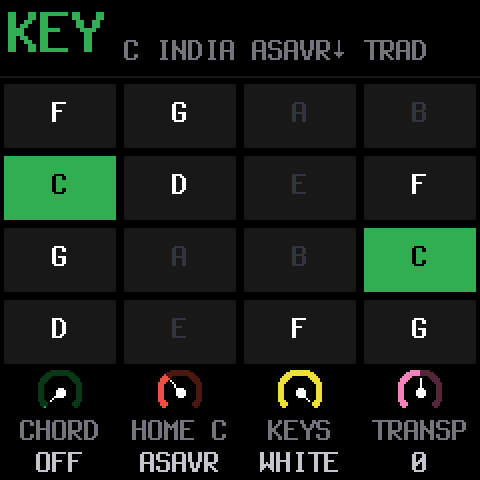
A scale whose two forms differ shows an arrow after its name in the title bar while SEL is held: ↑ for the ascending form, ↓ for the descending one, as the last key of the selected track went. Scales with one form (Western major, Bilawal…) show no arrow.
Chords on a maqam
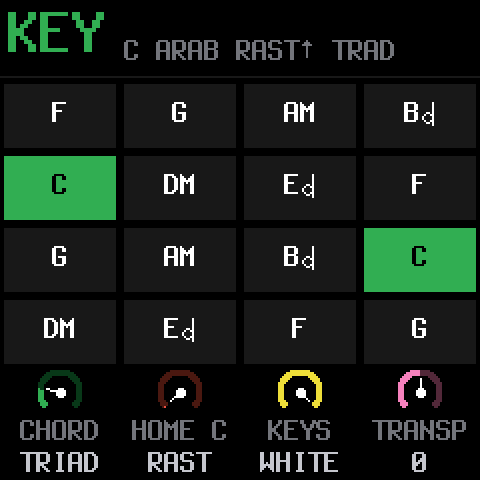
With KNOB 1 chord on, each tile shows the chord its key plays. In Rast, the chords on E and B are built on E half-flat and B half-flat (E and B with the half-flat glyph). They are neutral chords, neither major nor minor.
TRADITIONAL vs EQUAL
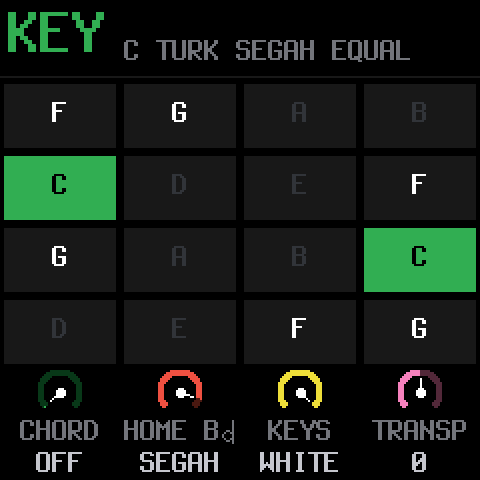
- EQUAL puts every note on the plain quarter-tone grid.
- TRADITIONAL (the default) nudges each note by a few cents, up to ±25, towards the tradition's own tuning:
- Turkish: Pythagorean ratios.
- Arabic: al-Ṣabbāgh (1954).
- Indian: just intonation.
Hold a note, then turn ALGORITHM back and forth: the pitch moves slightly. Western scales are the same in both. The title bar shows TRAD or EQUAL.
The dim tiles here (D, E, A, B) are keys with no note of Segah nearby. HOME shows B with the half-flat glyph, Segah's traditional root.
2. The SEL page (tap SEL)
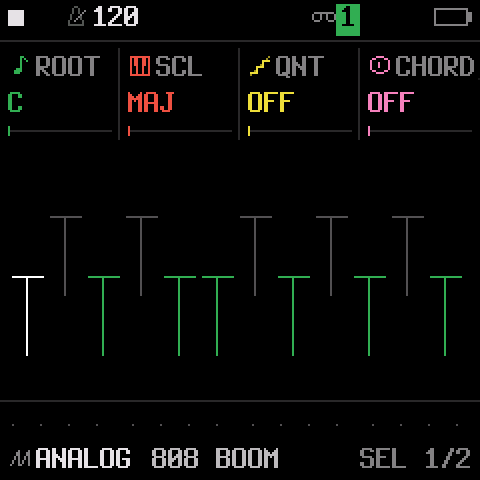
The top row has four values, one per knob: ROOT, SCL (scale), QNT (keys mode) and CHORD.
- They apply to the selected track only.
- Here KNOB 2 steps through all 52 scales in one list, in the same order as the sets: WEST, then TURK, ARAB and INDIA. The bar under each value shows its position.
The diagram, explained
The picture under the values is a one-octave keyboard, C to B, seen from the side:
      C# D#    F# G# A#        tall marks  = black keys
     C  D  E  F  G  A  B       short marks = white keys

   white mark = the root key
   coloured mark = a key that is in the scale (its note, or a quarter tone next to it)
   grey mark  = a key that is not in the scale
- WEST major on C (above): the root C is white, D E F G A B are coloured, and the black keys are grey. That's the plain major scale.
- ARAB Rast on C (below, left): D# and E are both coloured. That's because E half-flat sits between them. Likewise A# and B are both coloured, because of B half-flat.
- ARAB Sikah on E half-flat (below, right): two marks are white, D# and E, because the root itself sits between them.
| Rast on C | Sikah on E half-flat |
|---|---|
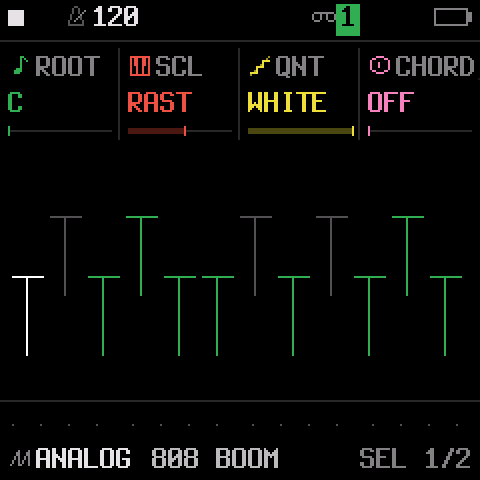 | 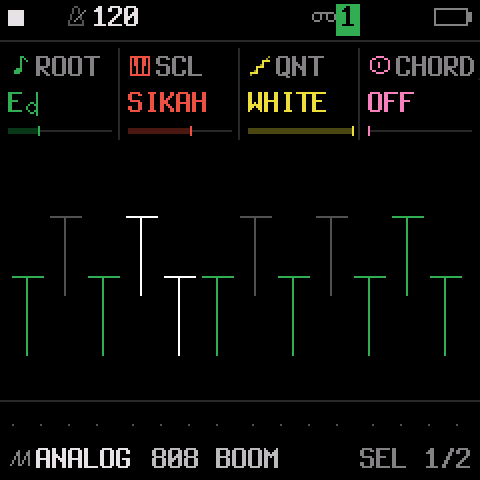 |
The diagram can't show quarter tones exactly. It lights the keys that reach a scale note. Two coloured keys side by side with a missing note between them, like D# and E in Rast, mean "a half-flat lives here". For the exact notes, use the tiles in the KEY layer with chords on, or record the scale and read the step tiles (section 3).
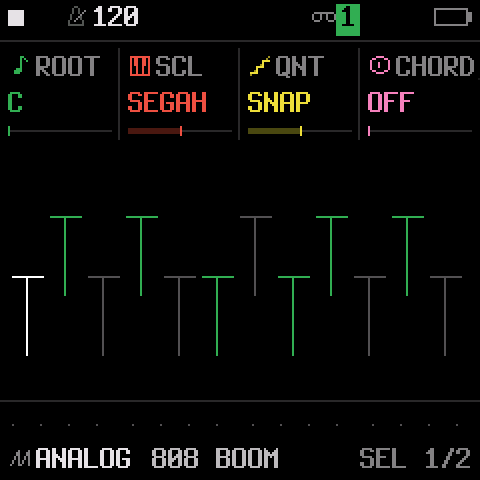
TURK Segah on C: only the keys near Segah's notes are coloured. The QNT value shows SNAP.
3. Steps with quarter tones and bends
The STEPS layer (hold SEQ)
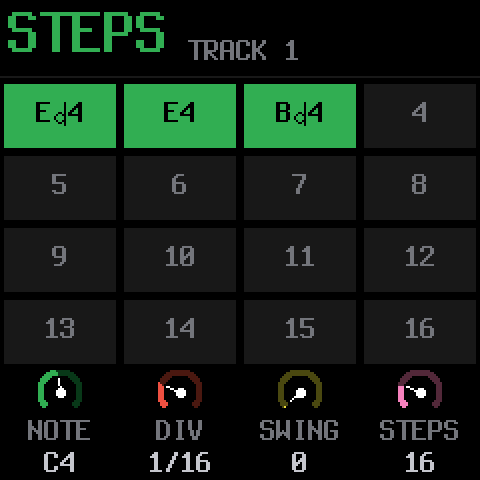
Each tile is a step. A step that holds a note shows its name with the half-flat or half-sharp glyph:
Ehalf-flat4is E half-flat.E4is plain E.Bhalf-flat4is B half-flat.
The STEP page (tap SEQ)
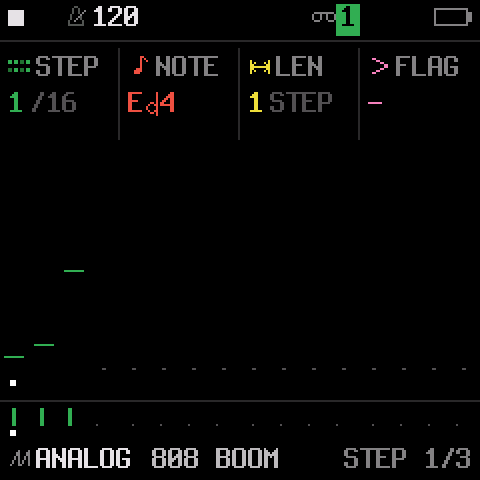
| Control | Does |
|---|---|
| KNOB 1 STEP | which step you're editing (1/16) |
| KNOB 2 NOTE | moves the note by semitones and keeps its quarter tone (E half-flat + 2 = F# half-flat) |
| OCT− or OCT+ held + KNOB 2 NOTE | moves the note by quarter tones (E, then one detent down = E half-flat); the octave doesn't change when you let go |
| KNOB 3 LEN, KNOB 4 FLAG | as in the base firmware (note length; accent, slide) |
The picture underneath is the pattern: each short line is a step's pitch, and the dots mark the steps.
CENT: fine tuning a track (SEL 2 page)
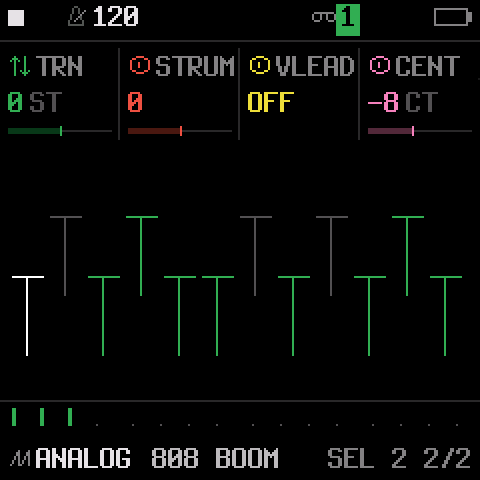
Tap SEL twice to get the SEL 2 page. KNOB 4 CENT tunes the whole track from −63 to +63 cents, one cent per detent. It adds to the scale's own tuning, up to ±100 cents in total.
A bend on one step: a CENT lock
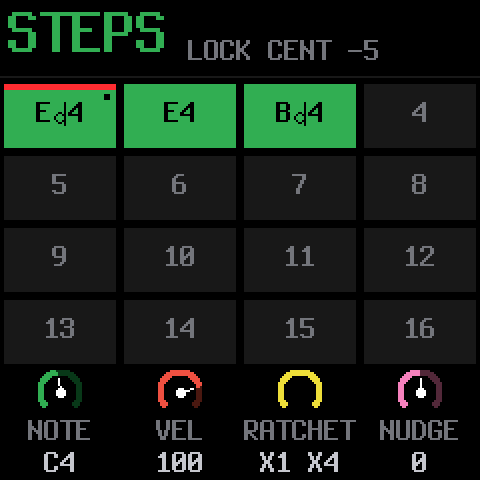
A step's bend is a lock of CENT on that step, made like any other parameter lock:
| Step | What you do | What you see |
|---|---|---|
| 1 | Hold SEQ and hold the step's key | the STEPS layer, that step selected |
| 2 | Turn ALGORITHM until the title reads LOCK CENT | the title shows the parameter being locked |
| 3 | Turn PRESETS | the lock is made, one cent per detent: LOCK CENT −5 |
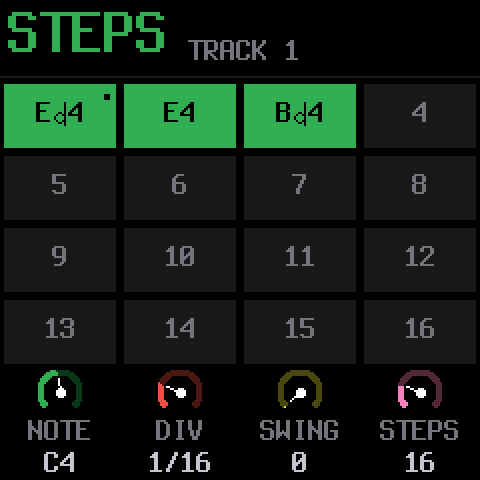
| 4 | Let go of the step | the step's tile keeps a small dot (top right): it holds a lock |
| Making the lock | After: the dot marks the locked step |
|---|---|
 |  |
- What it bends. The lock applies to every note of the step, so a chord bends as a whole. The next step without a lock goes back to the track's CENT.
- Clearing it. With the step held, OCT− clears the step's nudge, locks and condition, as in 2.6.
- What's saved. Locks and quarter tones are saved with the project.
Quick recipes
- Play a maqam in two moves.
- Hold SEL, then:
- turn PRESETS to
arab; - turn KNOB 2 to the maqam;
- set KNOB 3 to
white; - press the root key.
- turn PRESETS to
- Let go and play the white keys up and down.
- Hold SEL, then:
- Hear the traditional tuning. Hold a note, hold SEL, and turn ALGORITHM left (
equal) then right (trad). - One quarter tone anywhere. On a synth track, hold OCT− (lower) or OCT+ (higher) and press the key.
- Fine-tune one step. In the SEQ layer hold the step, turn PRESETS once (a lock), turn ALGORITHM to cent, then PRESETS for the bend.